Install firmware
Open sample tools separately if this panel does not load.
Open Songs & projects separately if this panel does not load.
Choose the right firmware
Details
First install replaces previous working data. Back up important samples before switching. Keep USB connected until installation finishes.
Technical details / activity log
Build history
Closer look
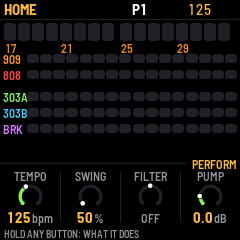
HOME / Pattern overview
Build a groove from drum patterns, two acid bass parts and sliced breaks. Shape it with swing, filter and pump.
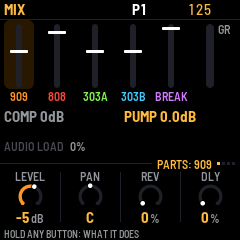
MIX / Part levels
Balance the five parts and place them in the mix with pan, reverb and delay.
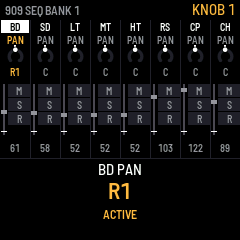
SMC / Mixer controls
Mix 909 drum lanes with hands-on faders and pan. BD, SD, LT, MT, HT, RS, CP and CH show the active drum bank.
Upcoming UI · not in offered buildsDetails: screen references
Illustrated firmware screens, not device photographs. HOME / MIX: 54f2ffbc. SMC: 65a0588, not in offered builds. Its link exceeded the size limit by 108 bytes: not downloadable or validated firmware. Check Install firmware for package availability and safety status.
Setup
Play standalone
- Install firmware for your keyboard model.
- Press PLAY. Use pads for steps and patterns; select a part to shape its sound.
Play without a computer.
Add an SMC mixer
Eight faders and encoders add hands-on mixing, mute and solo.
- Choose firmware with Bluetooth included.
- GLOBAL → BLUETOOTH MIDI: choose SMC HOST, enable Bluetooth and restart.
- Match SMC PRESET to the mixer’s DAW or USER preset.
One Bluetooth MIDI connection; no Bluetooth audio.
Perform with Loopy Pro
Launch clips with pad feedback; play instruments with SCALE, CHORD and ARP.
- Connect by USB to your iPad or Mac. Select the keyboard’s APC40 mkII controller in Loopy Pro.
- Press KNOB BANK for clip mode. OCT− / OCT+ move the pad view; change pages in Loopy for other clips.
Use USB for Loopy when SMC uses Bluetooth. Only one Bluetooth role at a time.
More features & compatibility
Create and play sounds Drums, acid bass and breaks.
- 909 / 808: choose from 11 drum voices in each kit, edit their sounds and sequence each voice.
- Two 303 parts: make separate bass lines with accents, slides and sound shaping; play live with Free Play. Pitch and mod wheels add temporary tune and cutoff movement on the selected 303.
- TB-3PO: generate and mutate acid lines using density, accents, slides, root and scale—useful when you want a starting point to reshape.
- Break player: slice a loop into eight pieces, change their sequence and use rolls, fills and retriggers for variation.
Sequence and record Patterns, motion and song.
- 32 patterns, up to 64 steps per part: give parts different lengths and rates; each can use its own pattern.
- Live or step recording: tap drum hits, enter 303 notes or record while playing.
- Motion and per-step locks: record knob movement or hold a parameter value on one step for changing timbre and rhythm.
- Probability and swing: let selected steps vary between passes and shift the groove away from straight timing.
- Chains and Song: chain patterns for a jam or arrange bars with pattern choices and mutes.
Perform and mix Shape a groove as it plays.
- Hands-on levels: keyboard fader banks cover the five parts, reverb, delay and the master filter, with pickup for smooth handovers.
- Sound movement: use the performance controls, part mutes, pan and sends; a shared reverb, tape delay and master compressor bring the parts together.
- SMC control: expand the surface with eight strips and drum banks. The available firmware and newer UI preview are identified separately.
- Loopy clip mode: switch pads from local sequencing to the host's clip grid; return to normal DnBOX operation with KNOB BANK.
- SCALE / CHORD / ARP for Loopy: keep played notes in a scale, build chords with inversions and strum, or create arpeggios with rate, gate, swing, humanize and latch.
Use your own loops and keep your work Samples, backups and projects.
- Sample management: prepare your own loops, inspect available slots, then explicitly send them to the keyboard. Sample memory is limited; the tool shows what fits.
- Backup and restore: save sample slots to a file and restore them through Manage samples.
- Project save / load: keep the current sounds, patterns and song; autosave and undo / redo support editing. Sample backup is a separate step.
- USB MIDI: use note and clock connections with other apps; choose one clock source for a steady tempo.
Check the fit for your gear Compatibility and practical limits.
Supports SMK-37 Elite and Pro; check Install firmware for available packages. Starrykey 37 Play uses the Pro model; choose the name intended for your keyboard. The keyboard's pads and keys play with fixed velocity. SMC uses a single direct Bluetooth MIDI link; Loopy uses USB in the combined setup. No Bluetooth audio or direct multi-SMC connection is offered here.
A matching stock firmware package can be restored with the original updater, M-VAVE's M-UPGRADE.
Help shape what comes next.
Browse feature requests and add a 👍 reaction, or suggest a feature on GitHub. Requests are ideas, not promised releases.